Subnets Do Not Catch Fish!
Despite the rumors, I can definitively state, for the record, that subnets do not catch fish, unless one uses the term "fish" to mean "newbies"!
The Context
I was in the process of setting up a demo Amazon Web Services (AWS) Elastic Cloud 2 (EC2) instance, and came across a situation that I believe might stump many PHP developers. My educative instincts kicked in when I went to launch the instance, but was stopped because I hadn't yet defined a VPC (Virtual Private Cloud). The potential show stopper for PHP developers wanting to launch a PHP website in a cloud container is the general lack of understanding of IP addressing and of subnets in particular.
IP Addressing
In this article I won't get into IPv6 (Internet Protocol version 6) as it's an entirely different subject! Instead I'll stick with IPv4 as that's what I saw when launching my instance.
Most of you know the history of TCP/IP (Transmission Control Protocol/Internet Protocol) networking. Originally a US Department of Defense project, TCP/IP originated from ARPANET research in the 1970s. Adopted as ARPANET's standard in 1983, TCP/IP became the foundation of what we now know of as the Internet.
IP addressing refers to the assignment of numbers to Internet servers or other end points.
Class Act
In its original conception, IP address blocks were visualized as being broken down into three classes:
- Class A addresses were intended for telecos, governments, and corporations with massive networks.
- Class B addresses were designed for universities and medium-to-large enterprises.
- Class C addresses were intended for all the rest of us peons.
In addition, a Class D was devised for multicasting, and a Class E for "experimentation." A more recent addition to the class system was the introduction of Private Networks, which I'll address later in this article.
Where it gets interesting is how subnets work, and how they apply to the different address classes. But, before diving into this, we need to have a look at what's happening at the binary bit level.
32 Bits
IPv4 addresses take the form of 4 numbers, from 0 to 255, represented in a "dot" format: nnn.nnn.nnn.nnn. It so happens that each number in this dot format represents 8 bits (i.e. a byte).
Here's a table that summarizes the range of various classes:
| Class | First Octet* Range | Leading Bits | Default Mask | Purpose |
|---|---|---|---|---|
| A | 1–126 | 0 | /8 | Very large networks |
| B | 128–191 | 10 | /16 | Medium-large networks |
| C | 192–223 | 110 | /24 | Small networks |
| D | 224–239 | 1110 | N/A | Multicast |
| E | 240–255 | 1111 | N/A | Experimental/reserved |
* An "octet" refers to 8 consecutive bits. A "host" is any device that needs to be contactable via the Internet (e.g., a server, a PC, or any device with a network interface that wants to be Internet accessible).
How Subnet Masks Work
The idea of a subnet mask is actually absurdly simple. A subnet mask is a 32 bit number that's applied against an incoming IP address using a logical AND operation. This allows IP routers to determine which portion of the IP address refers to the network and which to the hosts.
The value that follows the slash ("/") an IPv4 address range represents the number of bits that represents the network portion of that address range.
Here are three examples where the network portion matches full 8-bit bytes:
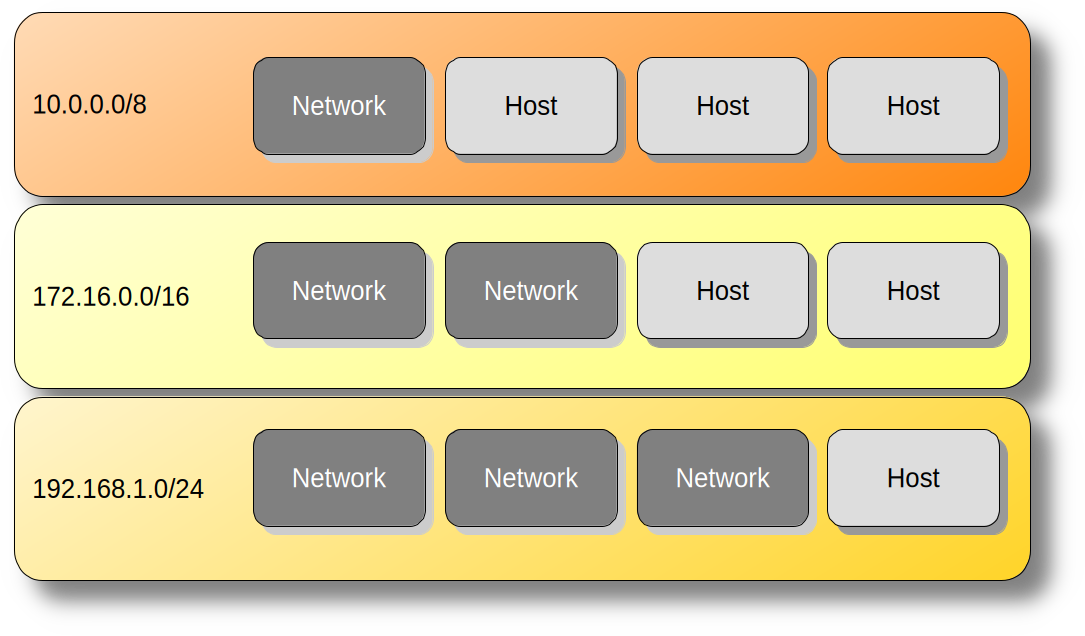
Most of us encounter private address blocks when setting up home routers. When you activate the NAT feature, the router "translates" the IP addresses of packets originating from inside the privately addressed into a valid routable address.
Back to AWS
Finally I can circle back to the entire reason behind writing this article! When setting up my AWS EC2 instance, I needed to set up a VPC. This makes complete sense in that in most instances you might be building an orchestrated system of cloud containers that privately exchange information.
Here's what I saw when setting up the EC2 instance:
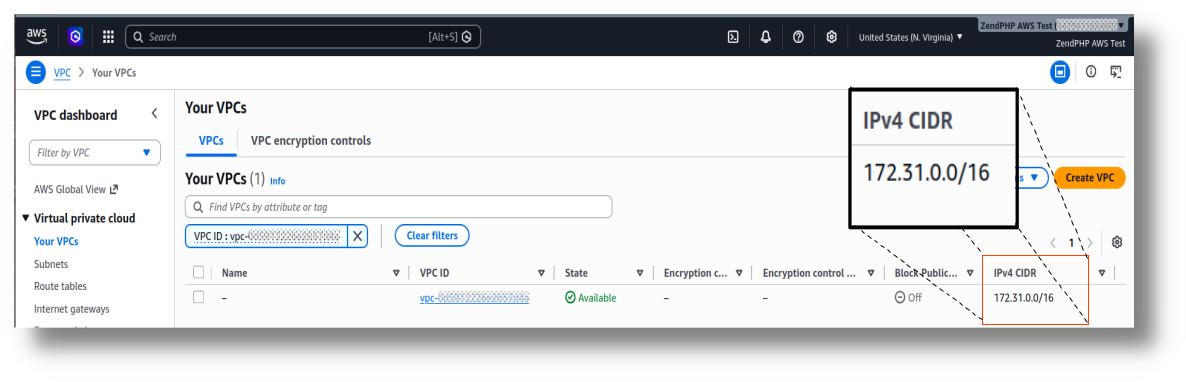
Breaking this down, the higher 16 bits (i.e. 2 bytes) of the larger VPC address block represent the network portion of the address.
This leaves the lower 16 bits to the host portion. This means that this VPC can support IP addresses that range from 172.31.0.1 all the way up to 172.31.255.255.
However, the AWS interface also asked what subnets within that address range were needed. Fortunately Amazon creates defaults, but I strongly feel this is where confusion can creep in.
Subnet Masks That Cross the Byte Boundary
Have a look at the next dialog box where you can set up subnets:
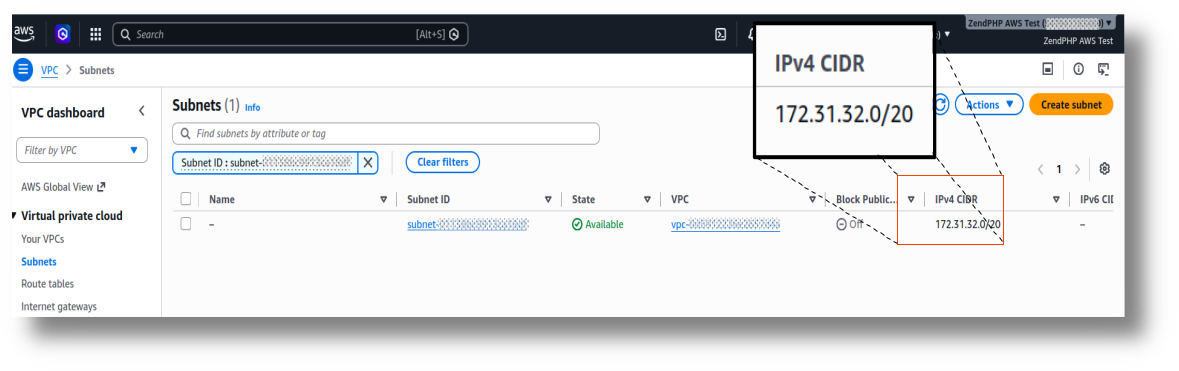
You'll notice that the number of bits representing the network do not fall evenly within the "byte boundary." In order to determine the range of allowed host IP addresses within this subnet, you'll need to go down to the bit level ... so here goes!
172.31.32.0/20 allocates the first 20 bits to the network and the remaining 12 bits to the hosts.
Here's how it can be visualized in binary:
Accordingly, with this subnet mask, IP addresses can range from 10101100.00011111.00100000.00000001 to 10101100.00011111.00101111.11111111 or, using decimal numbers, 172.31.32.0 to 172.31.47.255.
Final Words
A thorough understanding of networking is a must for any PHP developer wishing to move towards being a so-called full stack developer. For the most comprehensive work on TCP/IP networking, and digital communications technologies in general, have a look at Data and Computer Communications, 10th edition by William Stallings. He also provides coverage of IPv6, although I would recommend having a look at IPv6 Essentials by Silvia Hagen, referenced towards the start of this article.